

Understanding Ubersuggest
Ubersuggest is a freemium SEO tool designed to assist users in generating keyword ideas, analyzing competitors, and auditing websites. Originally created to scrape Google Suggest terms, it has evolved into a comprehensive platform under the ownership of Neil Patel. The tool offers a variety of features that cater to different aspects of SEO, making it a valuable resource for anyone looking to improve their online visibility.
Key Features of Ubersuggest
- Keyword Research: Ubersuggest provides a robust keyword research tool that helps you discover new keywords related to your niche. You can enter a seed keyword and receive a list of suggestions, including long-tail variations, along with essential metrics such as search volume, cost-per-click (CPC), and competition levels.
- Site Audit: This feature allows you to analyze your website’s health by identifying SEO issues that may hinder your performance. The audit report highlights critical errors, warnings, and recommendations for improvement.
- Traffic Analysis: Ubersuggest enables you to analyze your competitors’ websites, providing insights into their organic traffic, keyword rankings, and backlink profiles. This information can help you identify opportunities to outrank them. Website Promoters uses this to discover which keywords are actually leading to website visits and uses that in seo strategies to drive organic traffic to websites.
- Content Ideas: The tool generates content ideas based on popular topics within your niche. You can explore articles that have performed well in terms of social shares and backlinks, giving you inspiration for your own content. Ubersuggest is quite helpful in determining which keywords pages of websites can rank higher for if the page is set up properly.
- Backlink Analysis: Ubersuggest allows you to examine the backlink profiles of your competitors, helping you identify potential link-building opportunities. This is a crucial aspect of SEO to find out more about. Visit the Website Promoters’ page, all about Google PageRank here.
Getting Started with Ubersuggest
To begin using Ubersuggest, follow these simple steps:
Step 1: Create an Account
Visit the Ubersuggest website and sign up for a free account. The free version offers limited features, but it’s sufficient for basic keyword research and site audits. If you require more advanced capabilities, consider upgrading to a paid plan.
Step 2: Set Up Your Project
Once you’ve created your account, you can set up a project by entering your website’s URL. This will allow Ubersuggest to track your site’s performance and provide tailored insights.
Step 3: Explore the Dashboard
Familiarize yourself with the Ubersuggest dashboard. Here, you’ll find various tools and reports, including keyword suggestions, site audits, and traffic analysis. Take some time to navigate through the different sections to understand what each feature offers.
Conducting Keyword Research
Keyword research is a fundamental aspect of SEO, and Ubersuggest makes it easy to find relevant keywords for your content strategy.
Step 1: Use the Keyword Ideas Tool
- Navigate to the “Keyword Ideas” section in the dashboard.
- Enter a seed keyword related to your niche.
- Review the list of keyword suggestions generated by Ubersuggest.
Step 2: Analyze Keyword Metrics
For each keyword, Ubersuggest provides valuable metrics, including:
- Search Volume: The average number of searches for that keyword per month.
- CPC: The average cost per click for paid advertising on that keyword.
- SEO Difficulty: A score indicating how challenging it is to rank for that keyword.
Step 3: Filter and Select Keywords
Use filters to narrow down your keyword options based on search volume, difficulty, and other metrics. Focus on long-tail keywords with lower competition, as they often yield higher conversion rates.
Performing a Site Audit
Regularly auditing your website is crucial for maintaining optimal SEO performance. Ubersuggest’s site audit feature helps you identify issues that may be affecting your rankings.
Step 1: Access the Site Audit Tool
- Click on the “Site Audit” option in the dashboard.
- Enter your website’s URL and initiate the audit.
Step 2: Review the Audit Report
Once the audit is complete, Ubersuggest will provide a detailed report highlighting:
- Critical Errors: Issues that need immediate attention, such as broken links or missing meta tags.
- Warnings: Less severe issues that should be addressed but are not critical.
- Recommendations: Suggestions for improving your site’s SEO performance.
Step 3: Implement Changes
Prioritize fixing critical errors first, followed by warnings and recommendations. Regularly conducting site audits will help you stay on top of any issues that may arise.
Analyzing Competitors
Understanding your competitors’ strategies can provide valuable insights into your own SEO efforts. Ubersuggest allows you to analyze their performance and identify opportunities for improvement.
Step 1: Use the Traffic Analyzer
- Navigate to the “Traffic Analyzer” section.
- Enter a competitor’s URL to view their estimated monthly traffic, organic keywords, and top-performing pages.
Step 2: Identify Top Pages
Review the list of top pages driving traffic to your competitor’s site. Analyze the keywords they rank for and the content that attracts visitors. This information can inspire your own content strategy.
Step 3: Explore Backlink Opportunities
In the “Backlinks” section, you can view the backlinks pointing to your competitor’s site. Identify high-quality sites linking to them and consider reaching out for potential link-building opportunities.
Generating Content Ideas
Creating high-quality content is essential for attracting and retaining visitors. Ubersuggest’s content ideas feature helps you discover popular topics within your niche.
Step 1: Access the Content Ideas Tool
- Click on the “Content Ideas” option in the dashboard.
- Enter a relevant keyword to generate a list of articles that have performed well.
Step 2: Analyze Content Performance
For each content idea, Ubersuggest provides metrics such as social shares, backlinks, and estimated visits. Use this data to identify topics that resonate with your audience.
Step 3: Create Your Own Content
Based on the insights gained, develop your own content that addresses similar topics. Ensure that your articles provide unique value and insights to stand out from the competition.
Building Backlinks
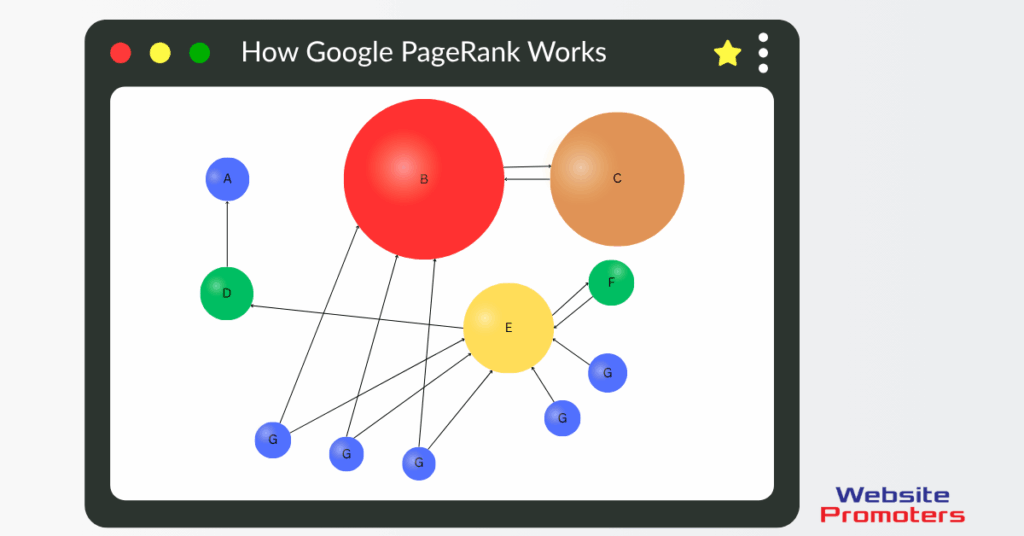
Diagram showing how Google PageRank works, with a central Google icon connected to multiple colored icons representing linked web pages, illustrating how links influence search ranking.
Backlinks are a crucial factor in improving your site’s authority and rankings. Ubersuggest can help you identify potential backlink opportunities.
Step 1: Analyze Competitor Backlinks
- Use the “Backlinks” feature to view the backlink profile of your competitors.
- Identify high-quality sites linking to them and consider reaching out for similar links.
Step 2: Create Valuable Content
Develop high-quality content that is likely to attract backlinks. This could include in-depth guides, infographics, or research studies that provide value to your audience.
Step 3: Outreach for Links
Reach out to websites that have linked to your competitors and pitch your content as a valuable resource. Personalize your outreach emails to increase the chances of securing backlinks.
Tracking Your Progress
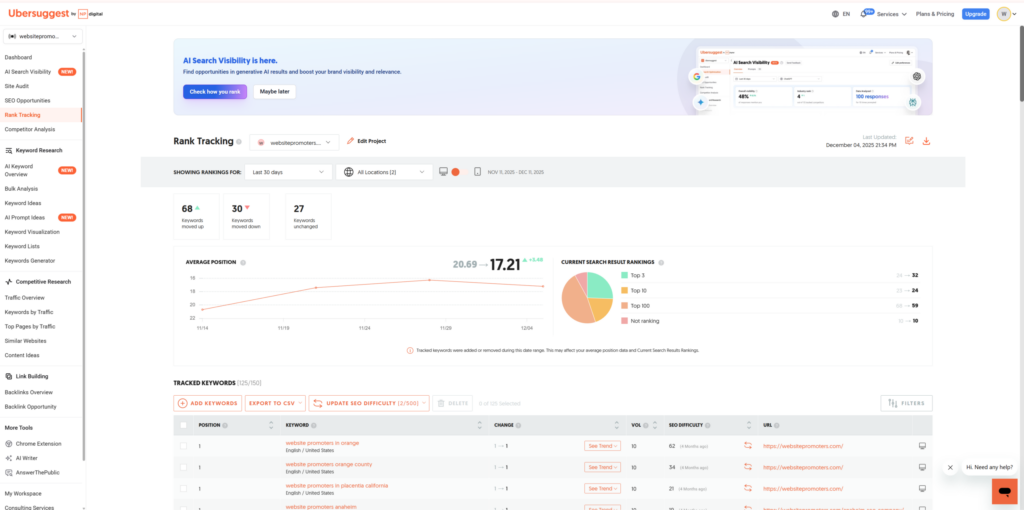
Monitoring your SEO performance is essential for understanding the effectiveness of your strategies. Ubersuggest provides tools to track your progress over time.
Step 1: Set Up Rank Tracking
- In the dashboard, navigate to the “Rank Tracking” section.
- Add the keywords you want to track and specify the locations you want to monitor.
Step 2: Monitor Changes
Regularly check your rank tracking report to see how your keywords are performing. Analyze fluctuations and adjust your strategies accordingly.
Step 3: Review Traffic Trends
Use the traffic analysis feature to monitor changes in your website’s organic traffic. Identify patterns and correlations with your SEO efforts to refine your approach.
Conclusion
Ubersuggest is a versatile SEO tool that can significantly enhance your online presence. By leveraging its features for keyword research, site audits, competitor analysis, content generation, and backlink building, you can develop a comprehensive SEO strategy that drives traffic and improves rankings. Regularly monitor your progress and adapt your strategies based on the insights gained from Ubersuggest to achieve long-term success in your digital marketing efforts.
By following the steps outlined in this guide, you can effectively utilize Ubersuggest to optimize your website and stay ahead of the competition. Whether you’re just starting or looking to refine your existing strategies, Ubersuggest offers the tools you need to succeed in the ever-evolving world of SEO.