

In the ever-evolving landscape of web design, staying ahead of the curve is essential. With the introduction of Divi 5, users are now equipped with powerful tools that enhance both functionality and accessibility. Among these innovations are Semantic Elements and Custom HTML Wrappers, which allow for greater flexibility and improved SEO performance. To read about all the exciting new features of Divi 5, check out our blog post here. This article will delve into these features, exploring their benefits, practical applications, and how they can transform your web design experience.
Understanding Semantic Elements
What Are Semantic Elements?
Semantic elements are HTML tags that convey meaning about the content they enclose. Unlike generic tags like <div> or <span>, semantic tags such as <nav>, <section>, <header>, and <footer> provide context to both users and search engines. This contextual information is crucial for accessibility, as it helps screen readers and search engine bots understand the structure and purpose of a webpage.
Importance of Semantic Elements for Accessibility and SEO
Using semantic elements enhances the accessibility of your website. Screen readers can navigate through the content more effectively, allowing users with disabilities to have a better experience. Additionally, search engines prioritize websites that utilize semantic HTML, which can lead to improved rankings in search results. By incorporating these elements, you not only create a more user-friendly site but also boost your SEO efforts.
How to Implement Semantic Elements in Divi 5
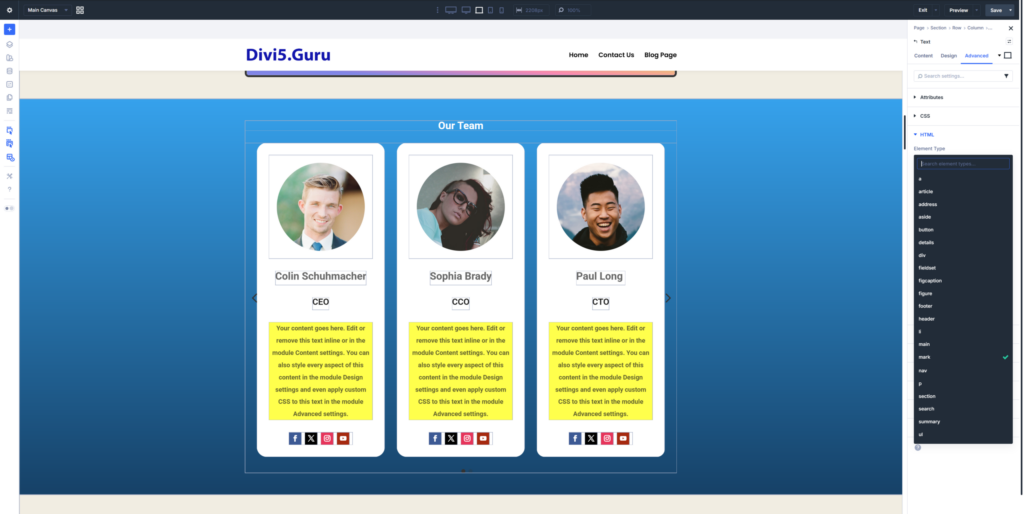
With Divi 5, implementing semantic elements is straightforward. Each module now includes an option to change the element type. Here’s how you can do it:
- Select the Module: Click on the module you want to edit.
- Access Settings: Open the settings panel for that module.
- Choose Element Type: Navigate to the advanced tab and select the desired semantic tag from the Element Type dropdown menu.
- Save Changes: Once you’ve made your selection, save the changes to apply the new semantic structure.
This simple process allows you to enhance the meaning of your content without needing extensive coding knowledge.
Custom HTML Wrappers: A New Level of Flexibility
What Are Custom HTML Wrappers?
Custom HTML Wrappers allow you to insert HTML code before and after any module in Divi 5. This feature provides designers with the ability to create unique layouts and functionalities that go beyond the standard offerings of Divi modules. Whether you want to add custom scripts, styles, or additional HTML elements, this feature gives you the freedom to do so.
Benefits of Using Custom HTML Wrappers
- Enhanced Customization: You can tailor your modules to fit specific design needs, making your website stand out.
- Improved Functionality: By injecting custom code, you can add features that are not natively supported by Divi, such as third-party integrations or advanced styling options.
- Better Control Over Layout: Custom wrappers allow for more precise control over the positioning and behavior of elements on your page.
How to Use Custom HTML Wrappers in Divi 5
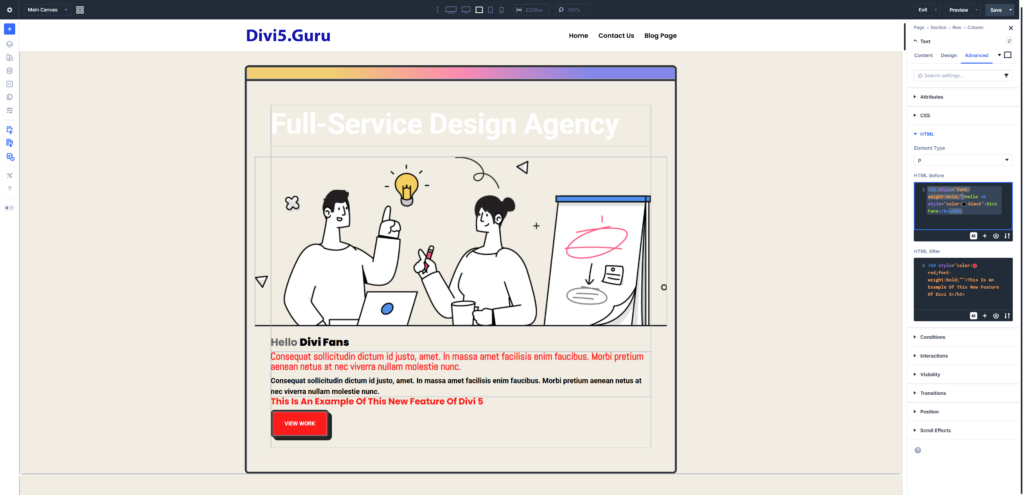
To utilize Custom HTML Wrappers, follow these steps:
- Select the Module: Choose the module you wish to customize.
- Open Settings: Access the settings panel for that module.
- Add Custom HTML: In the advanced tab, you will find options to insert HTML before and after the module. Enter your desired code in these fields.
- Save Changes: After adding your custom HTML, save your changes to see the effects on your page.
This feature opens up a world of possibilities for web designers looking to create unique and engaging websites.
Practical Applications of Semantic Elements and Custom HTML Wrappers
Creating a Custom Navigation Menu
One of the most effective uses of semantic elements is in creating a custom navigation menu. By using the <nav> tag, you can inform screen readers that this section contains navigation links. Here’s how to do it:
- Build Your Menu: Use Divi’s text modules to create your menu items.
- Change the Element Type: Set the element type of the container module to
<nav>. - Add Custom HTML: If needed, use Custom HTML Wrappers to insert additional styling or scripts.
This approach not only enhances accessibility but also improves the overall structure of your website.
Structuring Content with Sections
When designing a webpage, it’s essential to organize content into meaningful sections. By using semantic tags like <section>, <article>, and <header>, you can create a clear hierarchy that benefits both users and search engines. Here’s how to structure your content:
- Divide Content into Sections: Use the
<section>tag for distinct content areas. - Add Headers: Utilize
<header>tags for titles and subtitles within each section. - Implement Articles: For blog posts or news articles, use the
<article>tag to encapsulate each piece of content.
This structured approach not only improves readability but also enhances SEO by providing search engines with a clear understanding of your content.
Advanced Features and Future Developments
Upcoming Enhancements in Divi 5
As Divi 5 continues to evolve, users can expect even more features that enhance the capabilities of Semantic Elements and Custom HTML Wrappers. Future updates may include:
- Enhanced Flexbox Support: Improved layout options that allow for more dynamic designs. To learn more about Flexbox check out our blog post about this Divi 5 feature here.
- Additional Semantic Tags: The introduction of new tags to further enhance accessibility and SEO.
- Integration with Third-Party Tools: Seamless connections with popular plugins and tools to expand functionality.
Staying Updated with Divi 5
To make the most of Divi 5, it’s crucial to stay informed about new features and updates. Here are some ways to keep up:
- Follow Divi’s Official Blog: Regularly check for announcements and tutorials. Also follow our blog here.
- Join the Divi Community: Engage with other users through forums and social media groups.
- Watch Tutorial Videos: Visual guides can provide insights into new features and best practices. Website Promoters’ YouTube page has dozens of videos all related to Divi 5.
By staying updated, you can leverage the full potential of Divi 5 and ensure your website remains competitive.
Conclusion
The introduction of Semantic Elements and Custom HTML Wrappers in Divi 5 marks a significant advancement in web design capabilities. By utilizing these features, you can create more accessible, SEO-friendly, and visually appealing websites. Whether you’re a seasoned designer or just starting, these tools empower you to take control of your web design process. Embrace the power of Divi 5 and unlock new possibilities for your online presence.
Incorporating these features into your workflow will not only enhance your design capabilities but also improve the overall user experience on your website. So, dive into Divi 5 today and start building exceptional websites that stand out in the digital landscape!